Symbol Libraries
WideQuick includes two types of symbol libraries for building process views — basic symbols and wired up symbols. Together they cover the most common components found in building automation and process control applications.
Basic symbols are found in the COMPONENTS object library and consist of geometric shapes representing physical components such as motors, pumps, valves and sensors. They are the building blocks for creating custom process objects.
Wired up symbols are found in the DAMPERS, MOTORS, SENSORS,
VALVES, and OTHERS object libraries. These are fully pre-configured objects
that combine a basic symbol with a DynTouch object, value displays, and status
indicators. For most use cases, wired up symbols are the recommended starting point
as they require only a tag connection to work out of the box.
Migrating from older projects
When importing a view from an older WideQuick project, all symbols are automatically upgraded to the new versions. The new symbols use the same object IDs as the old ones, so no manual replacement is needed.
Why the new symbols
The new symbols provide richer visual feedback than their predecessors through a two-layer animation system built from two concentric circles. The gif below shows the new symbol cycling through alarm, warning and active states:
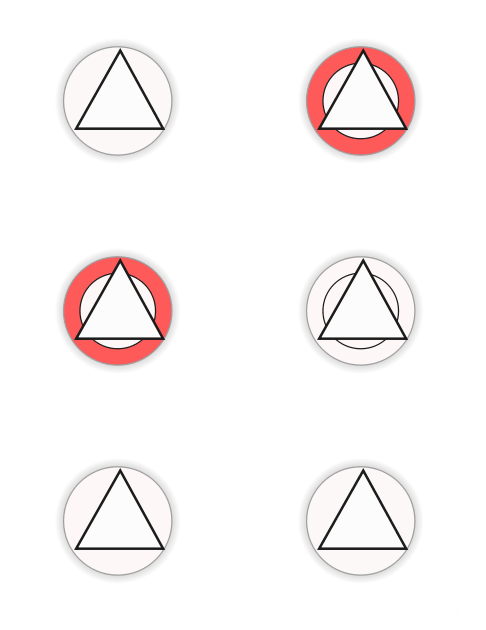
The older symbols supported basic dynamics — for example a simple color change on alarm. The new symbols go further by providing two independent animation layers:
- Outer circle — shows a solid color when an alarm is active, providing a clear background highlight that remains visible even when the inner circle is not blinking
- Inner circle — blinks in the color of the highest priority active category, cycling through alarm, warning, and service states
This means a user can immediately see both that an alarm is active and its severity at a glance, without having to open the popup. The two layer system also means that multiple states can be communicated simultaneously — for example an active warning with a background alarm highlight.
All new symbols are fully compatible with the Workview Animation system, meaning they respond automatically to all configured animation categories without any additional setup.
Basic symbols - COMPONENTS
The COMPONENTS object library contains the base symbols used to represent physical components in process views. Each symbol already includes the two-layer animation system, making them ready to use as building blocks for custom objects.
Use basic symbols when the pre-configured wired up symbols do not match your needs and you want to build a fully custom object. For most use cases the wired up symbols in the DAMPERS, MOTORS, SENSORS, VALVES, and OTHERS libraries are the recommended starting point.
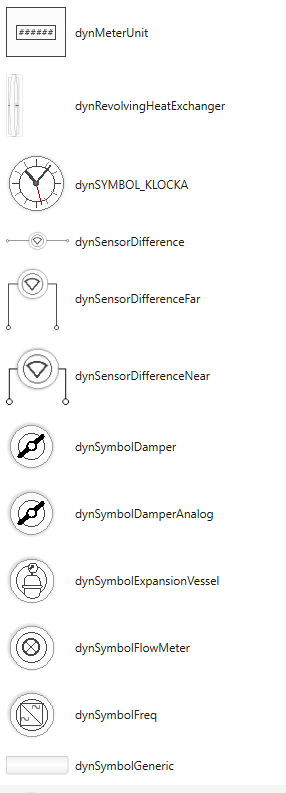
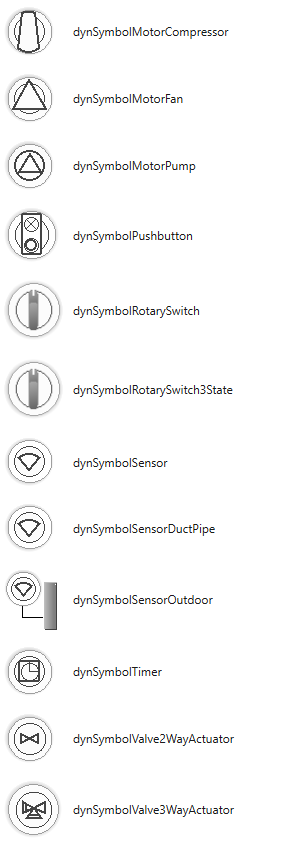
The following symbols are available:
| Symbol | Description |
|---|---|
dynMeterUnit |
Energy meter unit |
dynRevolvingHeatExchanger |
Revolving heat exchanger |
dynSYMBOL_KLOCKA |
Clock symbol |
dynSensorDifference |
Differential sensor |
dynSensorDifferenceFar |
Differential sensor — far mounted |
dynSensorDifferenceNear |
Differential sensor — near mounted |
dynSymbolDamper |
Digital damper |
dynSymbolDamperAnalog |
Analog damper |
dynSymbolExpansionVessel |
Expansion vessel |
dynSymbolFlowMeter |
Flow meter |
dynSymbolFreq |
Frequency converter |
dynSymbolGeneric |
Generic symbol |
dynSymbolMotorCompressor |
Motor compressor |
dynSymbolMotorFan |
Motor fan |
dynSymbolMotorPump |
Motor pump |
dynSymbolPushbutton |
Pushbutton |
dynSymbolRotarySwitch |
Rotary switch — 2 state |
dynSymbolRotarySwitch3State |
Rotary switch — 3 state |
dynSymbolSensor |
Sensor |
dynSymbolSensorDuctPipe |
Duct/pipe mounted sensor |
dynSymbolSensorOutdoor |
Outdoor sensor |
dynSymbolTimer |
Timer |
dynSymbolValve2WayActuator |
2-way valve with actuator |
dynSymbolValve3WayActuator |
3-way valve with actuator |
The COMPONENTS library also contains a set of supporting objects such as status texts, value displays, and indicators. These are useful when building custom objects and complement the base symbols. For more information on building custom objects see Create Object.
DAMPERS
The DAMPERS object library contains pre-configured damper objects for both
digital and analog dampers. Each object comes with a DynTouch object, status
indicators, a manual mode indicator, and a name label — ready to connect to tags
by filling in the Connection, Device, Sys, and ObjectName properties
on the DynTouch object.
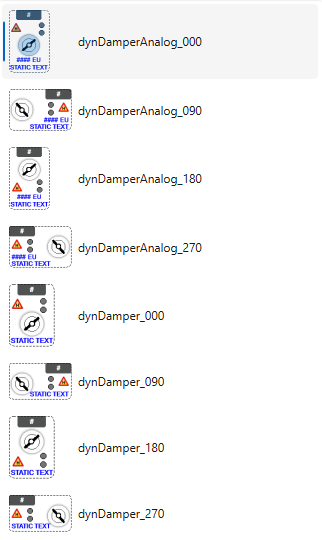
Each damper object is available in four orientations — 000, 090, 180, and 270 degrees — to match the layout of the process view.
The following objects are available:
| Object | Description |
|---|---|
dynDamperAnalog_000 |
Analog damper — 0° |
dynDamperAnalog_090 |
Analog damper — 90° |
dynDamperAnalog_180 |
Analog damper — 180° |
dynDamperAnalog_270 |
Analog damper — 270° |
dynDamper_000 |
Digital damper — 0° |
dynDamper_090 |
Digital damper — 90° |
dynDamper_180 |
Digital damper — 180° |
dynDamper_270 |
Digital damper — 270° |
Pre-configured indicators
Each damper object includes the following pre-configured visual elements:
- Manual mode indicator — displays an H symbol when the damper is in manual mode
- Alarm indicator — upper status circle turns red when an alarm is active
- Warning indicator — lower status circle turns orange when a warning is active
- Status text — displays Open or Closed for digital dampers
- Name label — displays the object name
The analog damper objects are pre-configured to the analogOutputValue suffix alias.
The damper line rotates to reflect the current value of analogOutputValue, visually
indicating the opening position. The initial position of the line can be set to match
whether the damper is normally open or normally closed. The current opening percentage
is displayed alongside the symbol, for example 42 %.
MOTORS
The MOTORS object library contains pre-configured motor objects for compressors,
fans, pumps, frequency converters, and revolving heat exchangers. Each object comes
with a DynTouch object, status indicators, and a name label — ready to connect to
tags by filling in the Connection, Device, Sys, and ObjectName
properties on the DynTouch object.

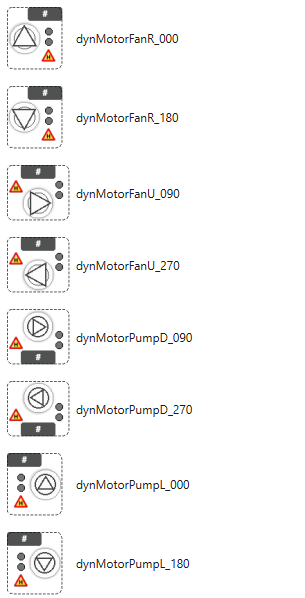
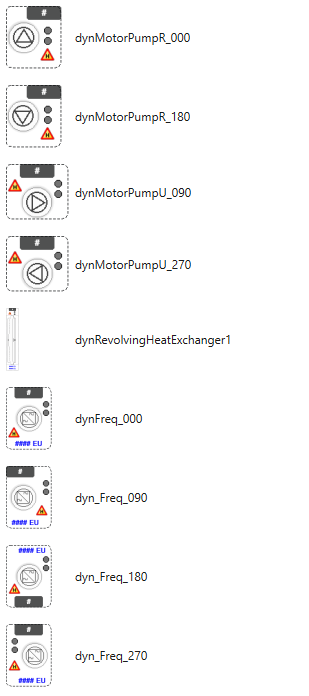
Each motor object is available in multiple orientations to match the layout of the process view. The suffix letter indicates the direction of the motor symbol: D (down), L (left), R (right), U (up).
The following objects are available:
| Object | Description |
|---|---|
dynMotorCompressor_000 |
Motor compressor — 0° |
dynMotorCompressor_090 |
Motor compressor — 90° |
dynMotorCompressor_180 |
Motor compressor — 180° |
dynMotorCompressor_270 |
Motor compressor — 270° |
dynMotorFanD_090 |
Motor fan — facing down |
dynMotorFanD_270 |
Motor fan — facing down, mirrored |
dynMotorFanL_000 |
Motor fan — facing left |
dynMotorFanL_180 |
Motor fan — facing left, mirrored |
dynMotorFanR_000 |
Motor fan — facing right |
dynMotorFanR_180 |
Motor fan — facing right, mirrored |
dynMotorFanU_090 |
Motor fan — facing up |
dynMotorFanU_270 |
Motor fan — facing up, mirrored |
dynMotorPumpD_090 |
Motor pump — facing down |
dynMotorPumpD_270 |
Motor pump — facing down, mirrored |
dynMotorPumpL_000 |
Motor pump — facing left |
dynMotorPumpL_180 |
Motor pump — facing left, mirrored |
dynMotorPumpR_000 |
Motor pump — facing right |
dynMotorPumpR_180 |
Motor pump — facing right, mirrored |
dynMotorPumpU_090 |
Motor pump — facing up |
dynMotorPumpU_270 |
Motor pump — facing up, mirrored |
dynRevolvingHeatExchanger1 |
Revolving heat exchanger |
dynFreq_000 |
Frequency converter — 0° |
dyn_Freq_090 |
Frequency converter — 90° |
dyn_Freq_180 |
Frequency converter — 180° |
dyn_Freq_270 |
Frequency converter — 270° |
Pre-configured indicators
Each motor object includes the following pre-configured visual elements:
- Alarm indicator — warning triangle turns red when an alarm is active
- Warning indicator — warning triangle turns orange when a warning is active
- Status indicators — circles showing active states
- Name label — displays the object name
The frequency converter objects are additionally pre-configured to the
analogOutputValue suffix alias and display the current output value with its unit,
for example 42 %.
SENSORS
The SENSORS object library contains pre-configured sensor objects for a wide
range of sensor types including standard sensors, dual sensors, differential sensors,
digital sensors, and outdoor sensors. Each object comes with a DynTouch object,
value displays, status indicators, and a name label — ready to connect to tags by
filling in the Connection, Device, Sys, and ObjectName properties
on the DynTouch object.
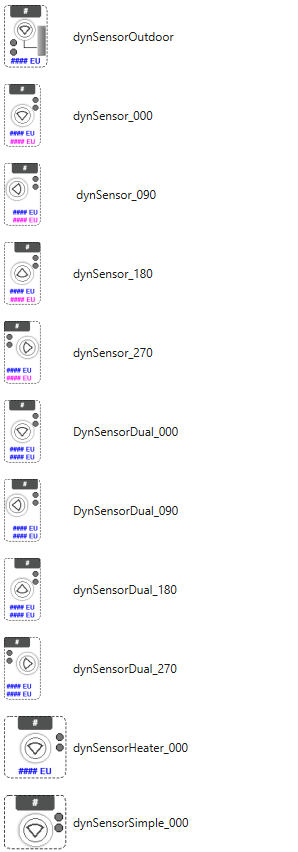
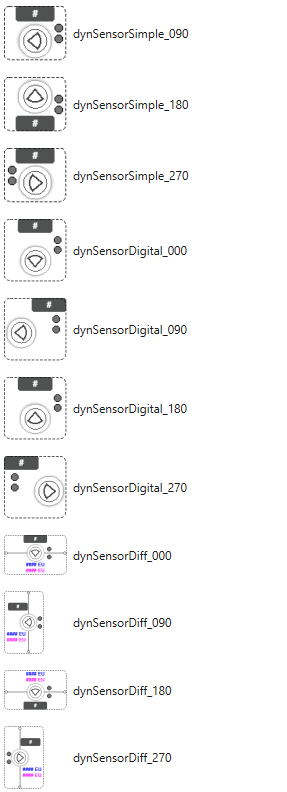
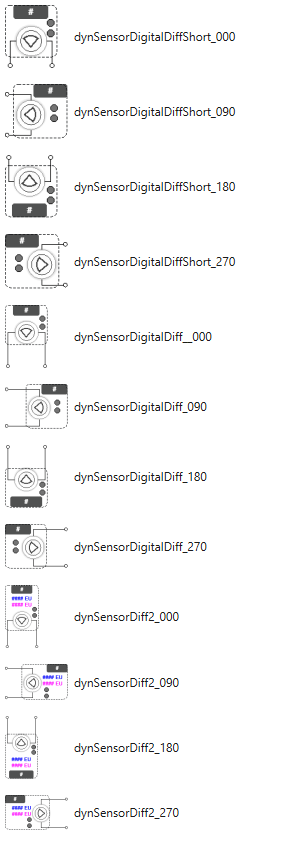
Each sensor object is available in four orientations — 000, 090, 180, and 270 degrees — to match the layout of the process view.
The following objects are available:
| Object | Description |
|---|---|
dynSensorOutdoor |
Outdoor sensor |
dynSensor_000 |
Standard sensor — 0° |
dynSensor_090 |
Standard sensor — 90° |
dynSensor_180 |
Standard sensor — 180° |
dynSensor_270 |
Standard sensor — 270° |
DynSensorDual_000 |
Dual sensor — 0° |
DynSensorDual_090 |
Dual sensor — 90° |
dynSensorDual_180 |
Dual sensor — 180° |
dynSensorDual_270 |
Dual sensor — 270° |
dynSensorHeater_000 |
Sensor with heater — 0° |
dynSensorSimple_000 |
Simple sensor — 0° |
dynSensorSimple_090 |
Simple sensor — 90° |
dynSensorSimple_180 |
Simple sensor — 180° |
dynSensorSimple_270 |
Simple sensor — 270° |
dynSensorDigital_000 |
Digital sensor — 0° |
dynSensorDigital_090 |
Digital sensor — 90° |
dynSensorDigital_180 |
Digital sensor — 180° |
dynSensorDigital_270 |
Digital sensor — 270° |
dynSensorDiff_000 |
Differential sensor — 0° |
dynSensorDiff_090 |
Differential sensor — 90° |
dynSensorDiff_180 |
Differential sensor — 180° |
dynSensorDiff_270 |
Differential sensor — 270° |
dynSensorDigitalDiffShort_000 |
Digital differential sensor short — 0° |
dynSensorDigitalDiffShort_090 |
Digital differential sensor short — 90° |
dynSensorDigitalDiffShort_180 |
Digital differential sensor short — 180° |
dynSensorDigitalDiffShort_270 |
Digital differential sensor short — 270° |
dynSensorDigitalDiff_000 |
Digital differential sensor — 0° |
dynSensorDigitalDiff_090 |
Digital differential sensor — 90° |
dynSensorDigitalDiff_180 |
Digital differential sensor — 180° |
dynSensorDigitalDiff_270 |
Digital differential sensor — 270° |
dynSensorDiff2_000 |
Differential sensor 2 — 0° |
dynSensorDiff2_090 |
Differential sensor 2 — 90° |
dynSensorDiff2_180 |
Differential sensor 2 — 180° |
dynSensorDiff2_270 |
Differential sensor 2 — 270° |
Pre-configured indicators
Each sensor object includes the following pre-configured visual elements:
- Value display — shows the current sensor value with its unit, for example
21.5 °C, connected to theprocessValuesuffix alias - Status indicators — circles showing active alarm and warning states
- Name label — displays the object name
Dual and differential sensor objects display two independent value readings, each connected to their own suffix alias.
VALVES
The VALVES object library contains pre-configured valve objects for two-way and
three-way valves. Each object comes with a DynTouch object, value displays, status
indicators, and a name label — ready to connect to tags by filling in the
Connection, Device, Sys, and ObjectName properties on the DynTouch
object.
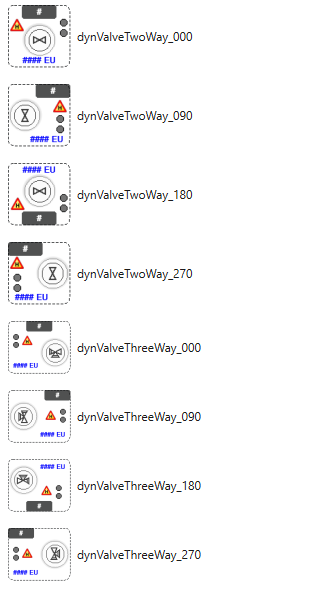
Each valve object is available in four orientations — 000, 090, 180, and 270 degrees — to match the layout of the process view.
The following objects are available:
| Object | Description |
|---|---|
dynValveTwoWay_000 |
Two-way valve — 0° |
dynValveTwoWay_090 |
Two-way valve — 90° |
dynValveTwoWay_180 |
Two-way valve — 180° |
dynValveTwoWay_270 |
Two-way valve — 270° |
dynValveThreeWay_000 |
Three-way valve — 0° |
dynValveThreeWay_090 |
Three-way valve — 90° |
dynValveThreeWay_180 |
Three-way valve — 180° |
dynValveThreeWay_270 |
Three-way valve — 270° |
Pre-configured indicators
Each valve object includes the following pre-configured visual elements:
- Position display — shows the current valve position as a percentage, for
example
75 %, connected to theanalogOutputValuesuffix alias - Alarm indicator — warning triangle turns red when an alarm is active
- Warning indicator — warning triangle turns orange when a warning is active
- Status indicators — circles showing active states
- Name label — displays the object name
OTHERS
The OTHERS object library contains pre-configured objects for components that
do not fit into the other four categories. Each object comes with a DynTouch
object and relevant displays — ready to connect to tags by filling in the
Connection, Device, Sys, and ObjectName properties on the DynTouch
object.
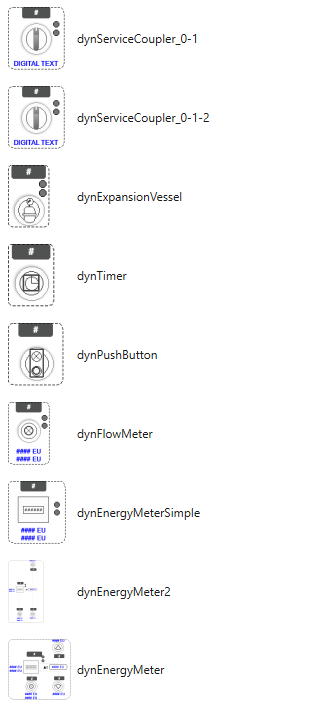
The following objects are available:
| Object | Description |
|---|---|
dynServiceCoupler_0-1 |
Service coupler — 2 state |
dynServiceCoupler_0-1-2 |
Service coupler — 3 state |
dynExpansionVessel |
Expansion vessel |
dynTimer |
Timer |
dynPushButton |
Pushbutton |
dynFlowMeter |
Flow meter with two value displays |
dynEnergyMeterSimple |
Energy meter — simple, two value displays |
dynEnergyMeter2 |
Energy meter — compact |
dynEnergyMeter |
Energy meter — full, multiple value displays |
Pre-configured indicators
- Service coupler — displays a digital text label showing the current state. The 3-state variant supports an additional intermediate state.
- Flow meter — displays two value readings connected to their own suffix aliases, for example flow rate and accumulated volume.
- Energy meters — display energy consumption values with units. The full
dynEnergyMeterdisplays multiple readings whiledynEnergyMeterSimpleanddynEnergyMeter2show a more compact view. - Timer, Pushbutton, and Expansion vessel — include status indicators and a name label.