Alarm Limits
The Alarm Limits popup gathers the alarm limits and alarm delays of the selected object in one place, so they can be read and adjusted without leaving the process view. It only appears in the Tab menu when the object has signals matching one or more of the configured suffix aliases for the Alarm Limits popup. In the Swedish user interface the tab is named Larmgränser.
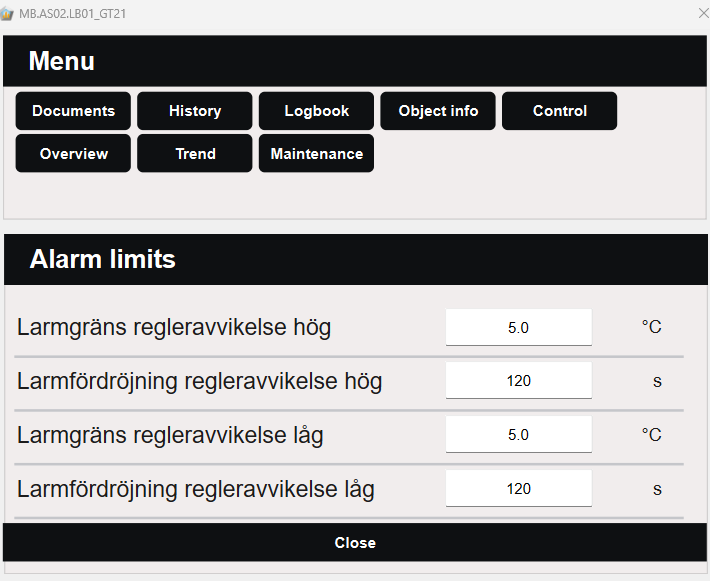
Limits and delays
Each row shows the description of the signal and its current value. The values can be edited directly in the row, as the default suffix aliases are configured as writable. Only the rows for signals that the object has are shown. The rows fall into two groups:
- Limits — the value at which an alarm is raised, for example the high or low limit for a control deviation, or the run-time limit.
- Delays — the time a condition must persist before the alarm is raised, for example for a fault, or for a valve that does not reach its open or closed position.
For how alarms are configured and handled, see Alarms.
Default suffix aliases
The following suffix aliases are configured for the Alarm Limits popup by default:
| Suffix alias | Suffix | Writable | Description |
|---|---|---|---|
alarmHighLimit |
_LAH_GL |
Yes | Alarm limit, control deviation high |
alarmHighDelay |
_LAH_FL |
Yes | Alarm delay, control deviation high |
alarmLowLimit |
_LAL_GL |
Yes | Alarm limit, control deviation low |
alarmLowDelay |
_LAL_FL |
Yes | Alarm delay, control deviation low |
lowAlarmLimit |
_LL_GL |
Yes | Alarm limit, low |
lowAlarmDelay |
_LL_FL |
Yes | Alarm delay, low |
positionLimit |
_LA_GL |
Yes | Alarm limit, deviating position |
positionDelay |
_LA_FL |
Yes | Alarm delay, deviating position |
notOpenDelay |
_LAO_FL |
Yes | Alarm delay, does not open |
notCloseDelay |
_LAS_FL |
Yes | Alarm delay, does not close |
runTimeLimit |
_DTL_GL |
Yes | Alarm limit, run-time alarm |
faultDelay |
_LD_FL |
Yes | Alarm delay, operating fault |
notAutoDelay |
_LM_FL |
Yes | Alarm delay, not in auto |
alarmDelay |
_L_FL |
Yes | Alarm delay |
Note
The default suffix aliases can be modified and extended in Settings → Suffix → Suffix Alias - Popups. See Create Popup for more information.