Process
The Process popup displays the process values and status signals connected to the selected object. It only appears in the Tab menu when the object has signals matching one or more of the configured suffix aliases for the Process popup.
For a guide on how to create and configure a custom Process popup, see Create Popup.
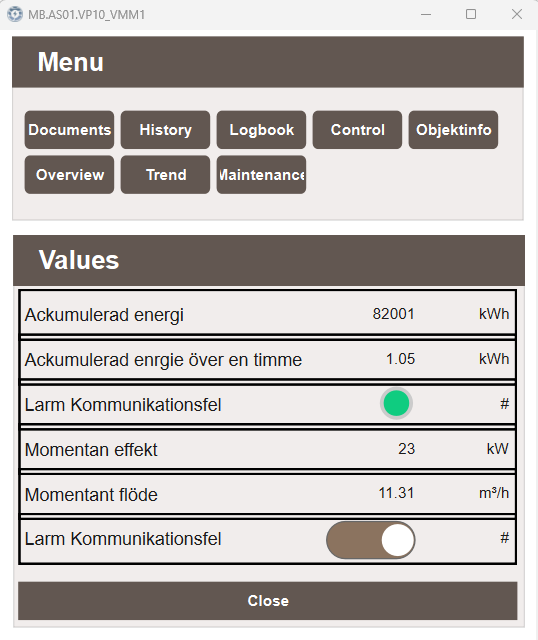
Values
The Values section lists all process signals connected to the object. Each row displays the signal description, its current value, and its unit. The appearance of each row depends on the signal type and whether it is configured as writable in Settings → Suffix → Suffix - Popups:
- Numeric values — displayed as a read-only value with its unit. If configured as writable, the value can be edited directly in the row.
- Boolean values — displayed as a status indicator when read-only, or as a toggle when configured as writable.
Default suffix aliases
The following suffix aliases are configured for the Process popup by default:
| Suffix alias | Suffix | Description |
|---|---|---|
| Flöde | _LPM |
Flow |
| Grumlighet | _TURB |
Turbidity |
| Kemisk Syreförbrukning | _COD |
Chemical oxygen demand |
| Konduktivitet | _COND |
Conductivity |
| Nivå | _LEVEL |
Level |
| Temperatur | _TEMP |
Temperature |
| Tryck | _PRESS |
Pressure |
| Upplöst Syre | _DO |
Dissolved oxygen |
| Uppsuspenderade partiklar | _TSS |
Total suspended solids |
| pH | _pH |
pH |
Note
The default suffix aliases can be modified and extended in Settings → Suffix → Suffix - Popups. See Create Popup for more information.