Regulate
The Regulate popup shows and sets the control-loop parameters of the selected object, such as the setpoint and the PID values. It only appears in the Tab menu when the object has signals matching one or more of the configured suffix aliases for the Regulate popup. In the Swedish user interface the tab is named Reglering.
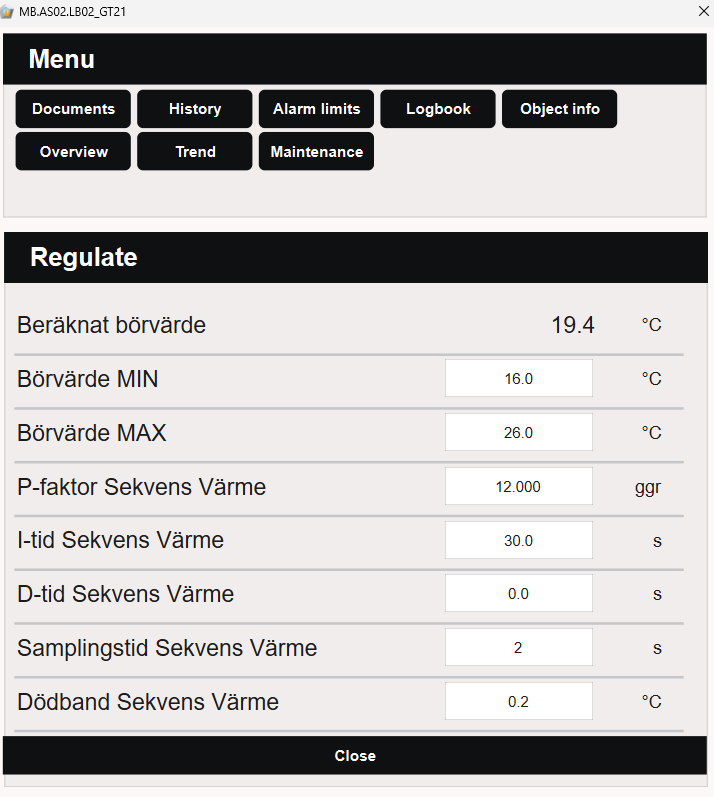
Setpoint
The setpoint section shows the setpoint, the calculated setpoint, and the limits and shift applied to it:
- Setpoint — the wanted value the regulator controls towards.
- Calculated setpoint — the setpoint actually used after limits and shift have been applied. It is read-only.
- Setpoint low / high — the lowest and highest setpoint that can be used.
- Setpoint shift — a shift applied to the setpoint.
Control parameters
The control parameters are the regulator's tuning values:
- P-factor — proportional gain.
- I-time — integration time.
- D-time — derivative time.
- Sample time — how often the regulator calculates a new output.
- Deadband — the range around the setpoint in which the regulator does not act.
For regulators with two control sequences, the same parameters are available a second time for sequence 2, together with a dead zone between sequence 1 and sequence 2. Only the rows for signals that the object has are shown.
Default suffix aliases
The following suffix aliases are configured for the Regulate popup by default:
| Suffix alias | Suffix | Writable | Description |
|---|---|---|---|
setpoint |
_BV |
Yes | Setpoint |
setpointCalculated |
_BB |
No | Calculated setpoint |
limitLow |
_BVL |
Yes | Setpoint low |
limitHigh |
_BVH |
Yes | Setpoint high |
setpointShift |
_BVF |
Yes | Setpoint shift |
pFactor |
_CP |
Yes | P-factor |
iTime |
_CI |
Yes | I-time |
dTime |
_CD |
Yes | D-time |
sampleTime |
_CS |
Yes | Sample time |
deadband |
_CH |
Yes | Deadband |
pFactor2 |
_2_CP |
Yes | P-factor, sequence 2 |
iTime2 |
_2_CI |
Yes | I-time, sequence 2 |
dTime2 |
_2_CD |
Yes | D-time, sequence 2 |
sampleTime2 |
_2_CS |
Yes | Sample time, sequence 2 |
deadband2 |
_2_CH |
Yes | Deadband, sequence 2 |
deadZone |
_CZ |
Yes | Dead zone, sequence 1-2 |
Note
The default suffix aliases can be modified and extended in Settings → Suffix → Suffix Alias - Popups. See Create Popup for more information.