Deploying WideQuick in Containers: A Guide for Automation Engineers and System Integrators
Introduction
If you’ve ever wrestled with deploying multiple HMIs or managing SCADA across several sites, you know how quickly things can get complicated. What if there was a way to simplify deployment, reduce headaches, and make your systems more scalable—all while saving resources? Enter containers.
In this guide, we’ll explore how running WideQuick in containers can transform your automation projects, whether you’re managing building automation or large industrial sites. Ready to future-proof your HMI/SCADA deployments?
Who is this Guide for?
- Automation engineers managing HMI/SCADA systems in industrial or building automation.
- System integrators deploying and maintaining multi-site or large-scale automation projects.
- IT administrators supporting containerized industrial software environments.
What Are Software Containers?
Think of a container as a portable, self-contained box that holds everything your software needs to run—except the operating system itself. Unlike bulky virtual machines that come with their own OS, containers share the host’s OS, making them lightweight and lightning-fast.
Why does this matter to you? Because containers let you run multiple WideQuick instances side-by-side without worrying about conflicts or wasted resources. It’s like having several mini-servers inside one or more physical machines, each perfectly isolated and ready to go.
There are many benefits to running in a container, some of which are:
- Isolation: Each container runs in its own isolated space, minimizing conflicts.
- Portability: Containers can run consistently across different hardware and environments.
- Efficiency: Reduced overhead compared to full virtual machines.
Why Should You Containerize WideQuick?
Run More HMIs, Use Less Hardware
Picture this: You’re tasked with deploying dozens of HMIs across a sprawling building complex or multiple industrial sites. Traditionally, you’d either dedicate a separate industrial PC or panel for every HMI, or set up a virtual machine for each instance. While this approach gets the job done, maintaining a large fleet of HMIs, especially when spread across wide geographic areas or stacked in complex virtual environments, quickly becomes inefficient and difficult to scale.
With containers, you can break free from these old constraints. Instead of tying up hardware or stacking up VMs, you can run multiple WideQuick instances on a single server, each in its own isolated container. This slashes hardware costs, reduces energy consumption, and streamlines your entire deployment.
-
Scaling up? Just launch another container.
-
Need to update? Swap out the image and restart.
It’s a smarter, leaner way to deliver robust HMI/SCADA solutions for modern building management and industrial automation.
Updates That Don’t Slow You Down
When a new WideQuick version drops, updating used to mean juggling installations on each machine. With containers, it’s as simple as swapping out the container image and restarting. Boom! Every instance is up-to-date in minutes.
- Update all WideQuick instances by simply updating the container image and restarting the containers.
- Roll back to previous versions quickly if needed.
Consistency You Can Count On
Deploying software across different environments often leads to tricky bugs and missing dependencies. Containers ensure your WideQuick setup runs exactly the same everywhere—on your laptop, your server, or the cloud.
- Eliminate the “it works on my machine” problem by ensuring every deployment is identical.
- Reduce troubleshooting time caused by missing dependencies or configuration differences.
Scale Up or Down on Demand
Need to add more HMIs for a new site or project? Just spin up more containers. Need fewer? Shut some down. It’s automation deployment with the flexibility you’ve always wanted.
- Containers use less memory and CPU than traditional virtual machines, allowing you to maximize hardware utilization.
Real-World Use Cases
- Building Management Systems: Run a dedicated WideQuick container for each building, all managed centrally with ease.
- Large Industrial Facilities: Deploy multiple HMIs on shared servers, reducing hardware footprint and simplifying maintenance.
- Multi-Site Operations: Standardize your HMI deployments across locations, ensuring consistent updates and performance.
Getting Started: Your First WideQuick Container
Step 1: Install Docker
Docker is your gateway to container magic. Docker Desktop is an easy and comprehensive way to get started with containers on Windows. It bundles everything you need, including the Docker engine, command-line tools, and a user-friendly interface—so you can build, run, and manage containers right from your desktop. For automation engineers and system integrators, this means you don’t have to worry about manual setup or compatibility issues: Docker Desktop handles all the heavy lifting.
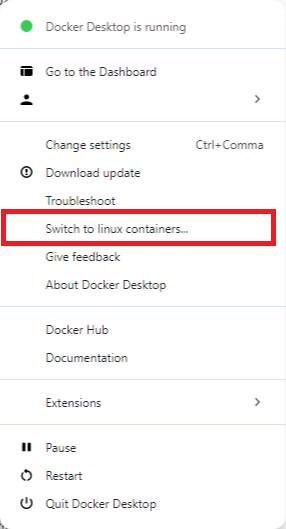
When working with WideQuick, it’s important to run containers in Windows containers mode, since running WideQuick in a container currently requires a Windows environment. Docker Desktop allows you to switch between Linux and Windows containers with just a click, ensuring your WideQuick instances run smoothly and natively on your system.
Download and install Docker Desktop for Windows, then switch it to Windows containers mode.
Step 2: Grab your WideQuick Image(s)
What is a container image?
Think of an image as a "blueprint"; a ready to use package of everything needed to run your WideQuick Application like software, libraries and settings. It is like having an optimized environment to run WideQuick!
You can't, however, run the image directly, you use the image to start a container. The container is the live, working version. One image, many containers. Want to run more than one HMI or SCADA on the same server? You can spin up multiple containers from the same image!
When you search for “Kentima” on Docker Hub via Docker Desktop, you’re tapping into the world’s largest library of ready-to-run container images. We host our WideQuick container images on a public repository in Docker Hub, making it easy for anyone in the community to access and deploy them. Docker Hub acts as a central “library” for container images, where organizations like Kentima can publish official, up-to-date images for everyone to use.
By using Docker Hub as our official repository, you get:
- Instant Access: Find the latest WideQuick images in seconds! No need to hunt for installers or worry about outdated files.
- Peace of Mind: All images are verified and maintained, so you know you’re getting the real deal, straight from the source.
- One-Click Updates: Need a new version? Just pull the updated image. No complex upgrade scripts or manual downloads.
- Team Collaboration: Everyone on your team can pull the same image, ensuring consistency across all your deployments.
In short, our public Docker Hub repo ensures you can get started with WideQuick containers quickly and confidently, with no barriers between you and your next automation project.
Steps to take
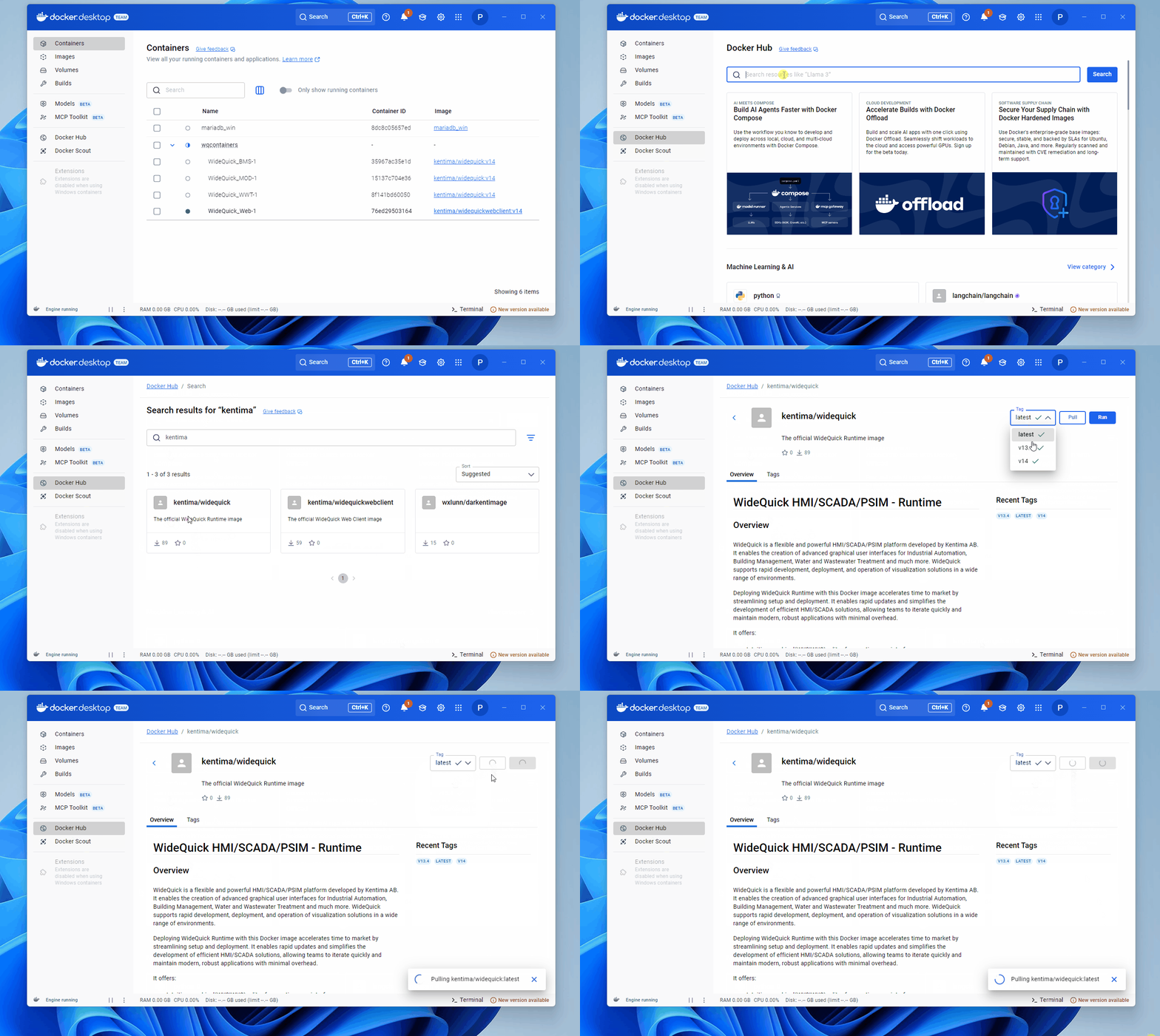
- In Docker Desktop, search for “Kentima” on Docker Hub.
- You’ll find images for WideQuick Runtime and WideQuick Web Client.
- Pull the image you need.
Step 3: License It Right
Before you can launch your new fancy WideQuick container, you’ll need a universal license key. Think of it like your all-access pass to run WideQuick in a modern containerized environment. To access a key, reach out to our sales team and they will sort one out for you. You can find contact information here
The universal license is designed to work seamlessly with containers, making your deployment process smooth and flexible.
Here’s how it works:
- Get your universal product key: This is your master key for container deployments.
- Generate a license key: Use your universal product key to create a unique license key for your specific WideQuick project.
- Add the key to your project: Drop the project key into your WideQuick project folder, which contains your project files.
- Start your container: Now you’re ready to go—your WideQuick instance will launch, once the container connects to the license server, a fully licensed application runs and is ready for action.
With the universal license, you can spin up, move, or scale WideQuick containers with confidence. Whether you’re running one HMI or a hundred across your sites!
Note
All versions 13.4 and above support universal license keys and play nicely with containers!
Step 4: Run the Container
-
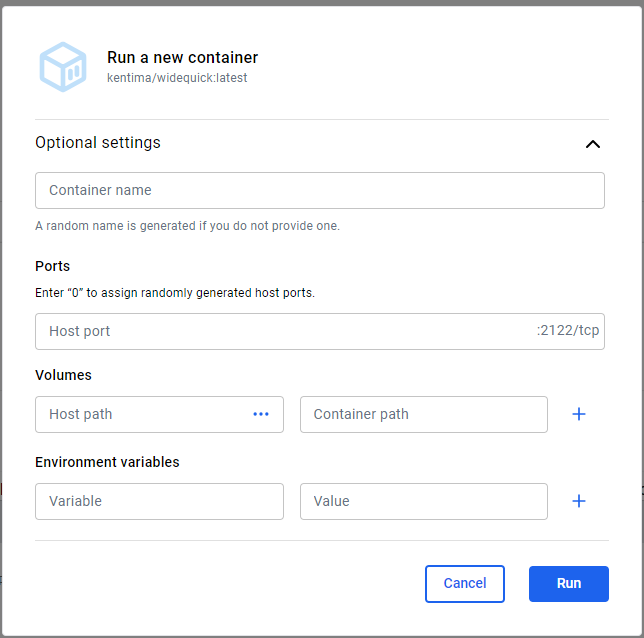
In Docker Desktop, launch the container from the image.
Configure:
- Container Name: Enter a suitable name for your container. Optionally, you can let Docker decide.
- Host Port: Enter port mapping. This lets you specify which port on your host machine maps to port 2122 inside the container.
- Host Path: Path to your WideQuick project on your host machine.
- Container Path: Set to
c:/wqprojectinside the container. This is the "Startup" folder of your container.
You can now reach your newly deployed container through the WideQuick Remote Client!
If you prefer using the command line
1 2 3 4 | |
Change:
- -p 2122:2122 to match your port mappings
- -v C:\MyProjects\WQProject to your project folder
- kentima/widequick-runtime:latest for relevant image for example kentima/widequick-runtime:14
Steps to take
- Start WideQuick Remote Client
- Add a system that targets 127.0.0.1 port 2122
- You now have access to your Runtime located inside your container!
Quick Security Note
Containers naturally help keep your applications separated and secure. Think of them as individual safety deposit boxes for your HMIs. But remember, even the best security features work best when paired with smart practices. Always follow your organization’s IT policies and industry standards, especially when you’re running critical industrial systems. A little vigilance goes a long way in keeping your automation environment safe and sound!
Making Changes? Easy!
Just edit your project in WideQuick Designer, make your changes, and save. Restart the container, and your changes go live almost instantly.
Ready to Take the Leap?
Containers are reshaping how automation engineers deploy and manage HMI/SCADA solutions. With WideQuick in containers, you get scalability, efficiency, and reliability! All wrapped in a neat, manageable package.
What’s next?
- Contact Sales to get a hold of your own universal product key!
- Try deploying WideQuick containers in your environment locally.
- Reach out for a personalized demo or expert advice.
- Scale with ease!