Calendar - Configuring
Events
Custom calendar events are created, edited and deleted directly in the calendar. They are stored in the maintenance database alongside maintenance data.
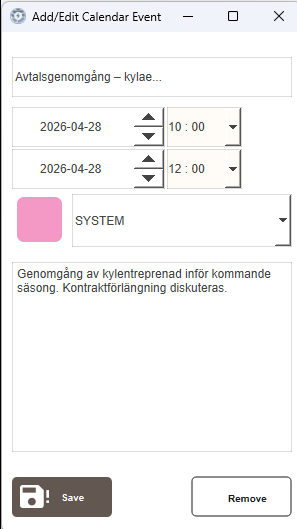
When creating or editing an event, a color can be selected from a fixed set of options: ENERGY, POWER, SYSTEM, SAFETY, SECURITY, HVAC, WATER, DEFAULT. These colors are defined in the CalendarColors theme in Themes.kdat.
Editing an event:
Click an existing event to open the Add/Edit Calendar Event popup. All fields can be updated. Click Save to apply the changes.
Deleting an event:
Open the event and click Remove. This removes the event permanently.
Maintenance Events
Maintenance deadlines from the Maintenance module are automatically shown in the calendar. They are read-only and cannot be edited or deleted from the calendar. Changes must be made in Maint. - List.
Each maintenance event is displayed on the day of its deadline. The color is set automatically based on the task's current status — it cannot be chosen manually. These colors are defined in the MaintenanceColors theme in Themes.kdat and are separate from the colors used for custom calendar events.
Clicking a maintenance event opens a popup showing the object, status, deadline and maintenance type. Click Open editing to navigate directly to that task in Maint. - List.
| Status | Color |
|---|---|
| Planned | Yellow |
| Missed | Dark red |
| Stopped | Gray |
| Reminder | Muted olive |

Reminders
A reminder event can appear in the calendar a set number of days before a maintenance deadline. The reminder appears as a separate entry with the color Reminder, distinct from the deadline event itself.
Reminders are enabled by default for tasks created without a template. Tasks created from a template use that template's reminder setting, which defaults to off. The default reminder offset is 3 days. See Extending for how to change these settings.
Next Steps
- Extending — reminder offset configuration