Tab
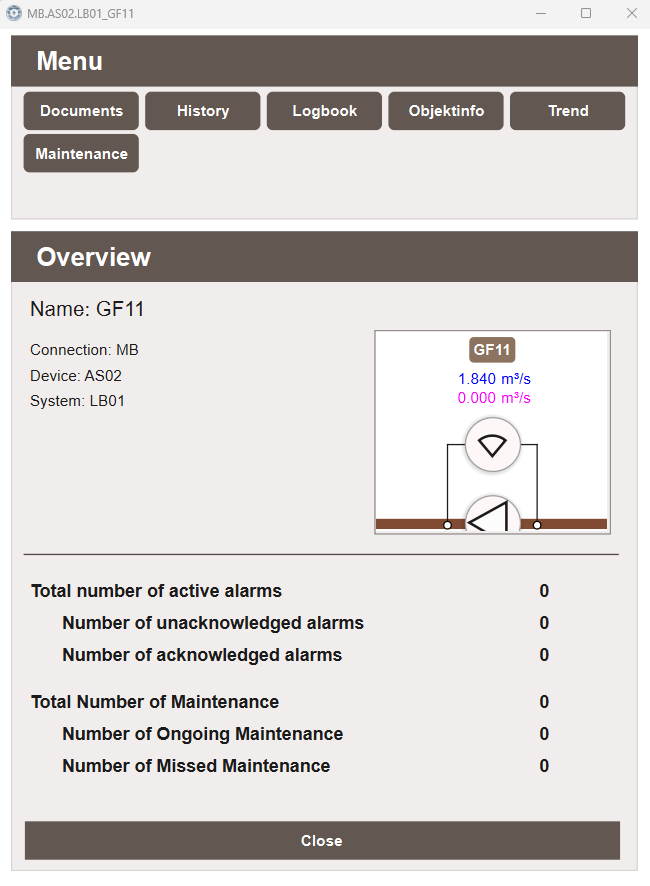
The Tab popup is the default popup that opens when a DynTouch object is clicked.
It acts as a navigation hub for all other popups available for that object, and
provides an immediate overview of the object's current status.
Menu
The Menu section at the top displays a button for each popup available for the object. The following popups are always visible regardless of which suffixes the object has:
- History
- Maintenance
- Object Info
- Trend
Additional popups — such as Process or Control — appear only when the object has signals matching the suffixes configured for that popup. See Suffix - Popups for more information on how popups are connected to suffixes.
The menu supports a maximum of 15 tabs. For information on creating custom popups see Create Popup.
Overview
The Overview section displays general information about the object:
- Name — the object name derived from the tag structure
- Connection — the connection the object belongs to
- Device — the device the object belongs to
- System — the system the object belongs to
- A miniature view of the object as it appears in the process view, automatically generated from its placement in the Workview
Alarm statistics
The overview also displays a live summary of the object's alarm status:
- Total number of active alarms
- Number of unacknowledged alarms
- Number of acknowledged alarms
These values are derived automatically from the object's tag name and do not require any additional configuration.
Maintenance statistics
Below the alarm statistics, a summary of the object's maintenance status is shown:
- Total number of maintenance tasks
- Number of ongoing maintenance tasks
- Number of missed maintenance tasks
These values are also derived automatically from the object's tag name.